
Contents of the Statistics table
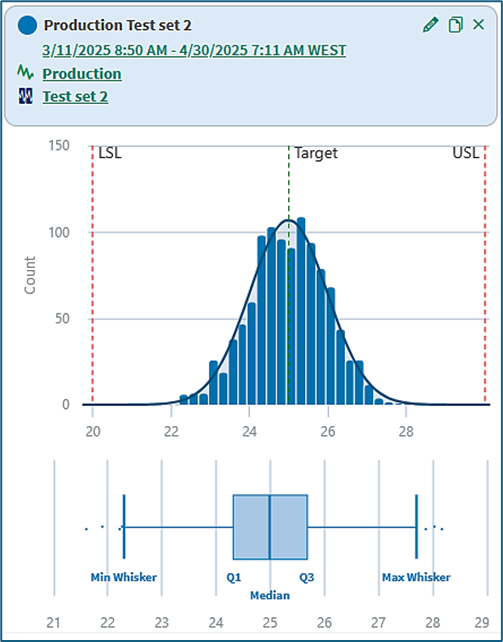
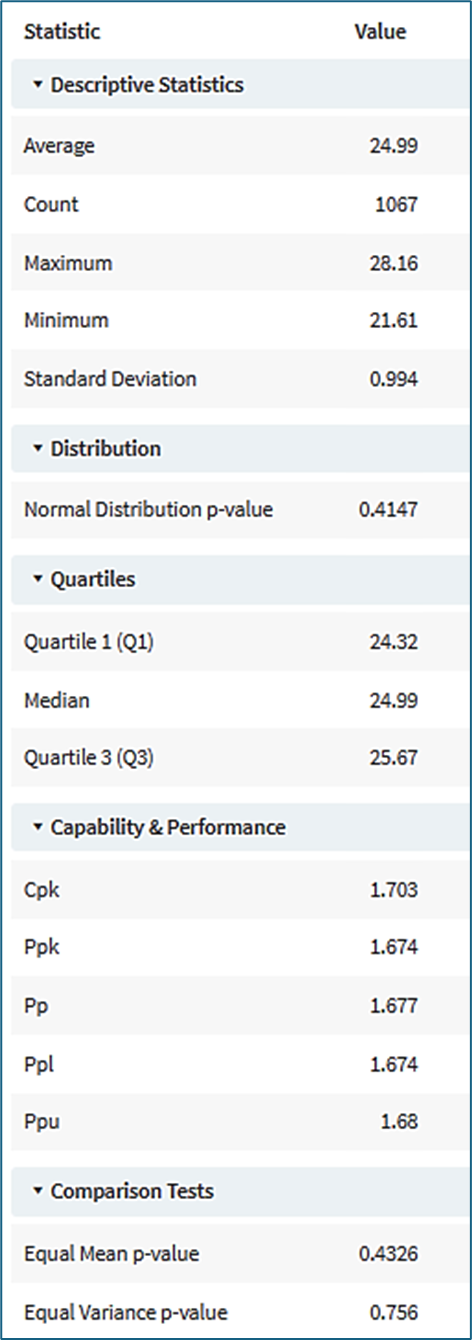
Descriptive statistics
Average: The mean value of the samples in the sample set
Count: The number of samples in the sample set
Maximum and Minimum: The largest and smallest values in the sample set
Standard Deviation: The sample standard deviation (equivalent to STDEV.S in Excel)
Distribution
Normal Distribution p-value: The probability value in a test for Normal distribution. A p-value smaller than 0.05 indicates that probability distribution of the sample set is most likely not Normal.
Quartiles
Quartile 1: Twenty-five percent of the samples in the sample set have values smaller than or equal to Quartile 1 (Q1).
Median: Fifty percent of the samples in the sample set have values smaller than or equal to the median.
Quartile 3: Seventy-five percent of the samples in the sample set have values smaller than or equal to Quartile 3 (Q3). Fifty percent of the samples have values between Q1 and Q3.
Capability and performance
The process performance metrics show how well an operating process consistently produces output that meets its specification limits.
Comparison tests
Comparison tests are displayed if a baseline Statistics Summary has been selected for comparison
Equal Mean p-value: The p-value is the probability that the means (the averages) of two Normal probability distributions are the same. A p-value smaller than 0.05 indicates that the means are most likely not the same.
Equal Variance p-value: The p-value is the probability that the variances of two Normal probability distributions are the same. A p-value smaller than 0.05 indicates that the variances are most likely not the same.
Box plot calculations
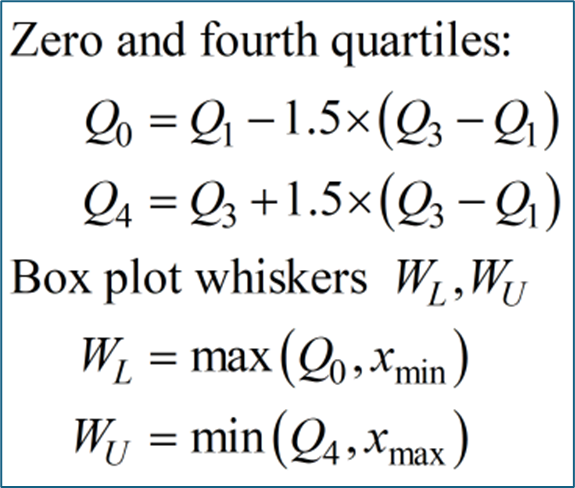
Whiskers and outliers
Whiskers: The lower whisker WL on the Box Plot is located at the larger of xmin (the minimum sample value), or at the zero quartile Q0.
The upper whisker WU is located at the smaller of xmax (the maximum sample value) or at the fourth quartile Q4. Figure 2 shows how these quantities are calculated.
Outliers: If any sample values lie below Q0 or above Q4 they are displayed on the box plot as outliers.
Performance calculations
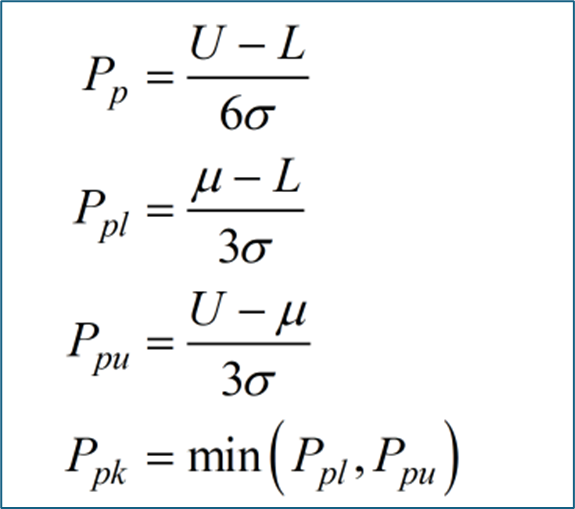
Process performance indexes
Figure 3 shows how the performance indexes are calculated. U and L represent the upper and lower specification limits, μ is the sample average from the Statistics Summary and σ is the sample standard deviation from the Statistics Summary.
Pp: The overall capability of a process comparing the full six-sigma spread of the data to the range between the upper and lower specification limits.
Ppl and Ppu: The performance relative to the lower and upper specification limits individually.
Ppk: The actual performance when the mean is not perfectly centered.
A low value for any of the four indexes indicates too many samples in the data set are lying beyond one or both of the upper and lower specification limits. Rules of thumb for Ppk are:
-
Ppk >= 1.33 is acceptable,
-
Ppk >=1.67 is good,
-
Ppk >= 2.0 is world-class.
Process capability index Cpk
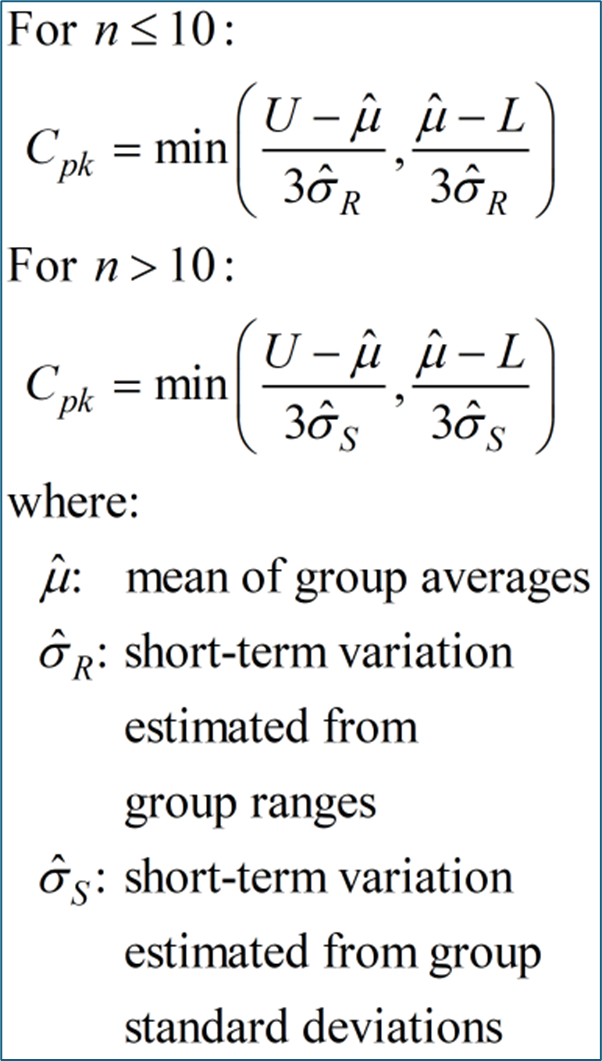
Figure 4 shows how the process capability index is calculated. Cpk uses estimates of within-subgroup (short term) variation rather than overall process deviation.
The signal is segmented into groups of n samples. The process average is calculated from the subgroup means, and the process variation is estimated from subgroup ranges for group sizes up to 10, or from subgroup standard deviations for groups of ten or more.
Capability indices should be interpreted only when the process is stable and in statistical control. Estimates of process variation may also become biased and artificially small when autocorrelation is present in the signal.
Probability calculations
Normality test: The Normality test uses the Shapiro-Wilk method with Royston approximation. The test is more reliable when the sample set has fewer than 5000 samples.
Comparison test for equal means: The test is the Student t-test. The test is most reliable when the two distributions being compared both have a Normal distribution.
Comparison test for equal valiance: The test is the F-test. The test is most reliable when the two distributions being compared both have a Normal distribution.
Autocorrelation and discrete signals
Narrow chart limits due to autocorrelated signals
I–MR chart limits are calculated using the moving range. For highly autocorrelated signals, moving ranges tend to be small because consecutive measurements are similar. This can produce unusually narrow control limits and excessive run-rule violations in the I-chart. Control limits and run rules should generally be applied to approximately independent observations where autocorrelation is absent.
Consider reducing the sampling frequency when strong autocorrelation is present.
Discrete signals in I-MR charts
I–MR charts rely on moving ranges, which are calculated from differences between consecutive measurements. Signals must therefore be continuous with interpolation between samples. Discrete signals and event-based data with no interpolation are generally not suitable for I–MR charts and can result in missing MR values and incomplete chart limits.
Consider adjusting the interpolation method of the signal to Linear or Step, while plotting the signal using the bar chart option to retain the discrete appearance.
Further information
Information is available in the Statistics Summary KB on the topics of:
-
Opening the Statistics Summary tool
-
Using the Statistics Summary tool
-
Content of a basic Statistics Summary
-
Content of a Statistics Summary with SPC Chart
-
SPC Chart types
-
SPC Chart limits
-
SPC run rules
-
The Limit and Sample Alignment conditions
Information is available in the View Statistics Summaries KB on the topics of:
-
Opening the View Statistics Summaries tool
-
Using the View Statistics Summaries tool
-
Summary Report
Information is available in the Operationalize Statistics Summaries KB on the topics of:
-
Opening the Operationalize Statistic Summary tool
-
Using the Operationalize Statistics Summary Tool
-
Output of a basic I-MR Operationalization run
-
Editing an Operationalized Statistics Summary
-
The Limit output and Sample alignment conditions
-
Statistics Operationalization
-
Output of a Statistics Operationalization run
-
The Rearrange outputs function
Information is available in the Summary Report KB on the topics of:
-
Opening a Summary Report
-
Tabbed viewing
-
Summary Report controls and configuration
-
Working with multiple statistics summaries
-
Quantitative comparisons