
Seeq Remote Agent Management
Purpose
This document provides recommended operational best practices for managing Seeq Remote Agents in production environments. The intent is to help customers align Remote Agent management with standard enterprise IT processes while keeping operational overhead low.
Overview of the Seeq Remote Agent
Seeq Remote Agents are designed to run as low-touch Windows services that securely broker data between on‑premises or private datasources and a Seeq SaaS tenant.
Runs as a Windows service
Requires outbound-only HTTPS/WSS connectivity over port 443 to the Seeq SaaS tenant (no inbound firewall rules required)
Does not perform analytics or long-running computation
Acts as a secure data conduit between datasources and Seeq
Ongoing Operational Support Tasks
In steady state, the Seeq Remote Agent requires minimal operational effort.
Weekly / Monthly Maintenance Tasks
Standard Windows server health checks:
CPU utilization
Memory utilization
Disk free space (ensure at least 10MB free space)
Verify the Seeq Remote Agent Windows service is running
Logs reviewed only if connectivity or datasource issues are reported
Proxy Management
If the environment uses an inspection or decrypting proxy, ensure the agent trusts the required certificate chains and that any proxy or certificate changes follow standard network change processes.
Loss of outbound connectivity or untrusted certificates will prevent the agent from connecting.
Upgrade Cadence and Support Lifecycle
Each Remote Agent version is supported for one year and immediate upgrades on new agent releases are not required.
Recommended Practice
Establish a quarterly upgrade cadence
Align upgrades with existing OS and infrastructure patching windows
This approach keeps agents within supported versions while minimizing operational risk.
Configuration Backups and Disaster Recovery
Recommended Backup Scope
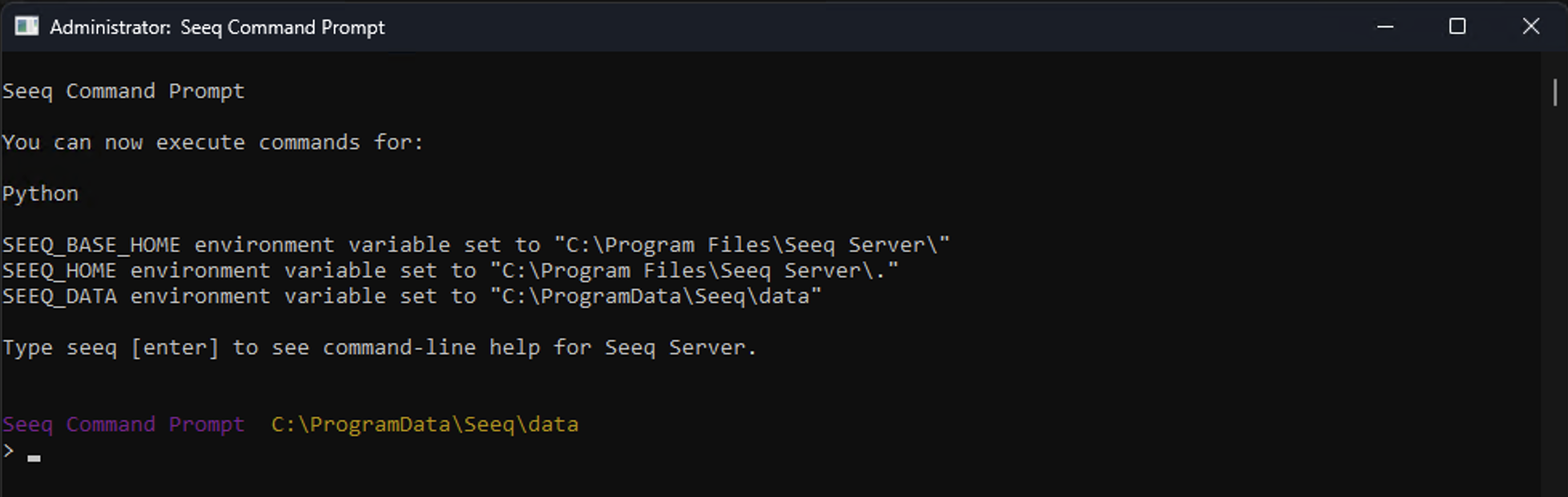
After datasource configuration changes, back up the agent’s SEEQ_DATA directory. This can be found by opening the Seeq Command Prompt and identifying the SEEQ_DATA environment variable as seen in the screenshot below.
Why This Matters
Backing up this directory allows you to:
Restore the agent after VM or machine failure
Avoid re‑provisioning and reconfiguring datasources
Preserve datasource identifiers and prevent worksheet breakage
This backup is particularly useful during:
OS rebuilds
VM loss
Datasource Authorization and Credential Rotation
Remote Agents authenticate to datasources using credentials defined in each datasource configuration.
Recommended Practice
Ensure there is an established process for:
Credential rotation
Password expiration
Service account changes
When credentials are rotated, the corresponding datasource configuration must be updated so the Remote Agent can continue to authenticate successfully.
Aligning this process with existing IAM or secrets‑management workflows typically works well.
Endpoint Security Considerations
If endpoint detection or protection (EDR) software is in use:
Ensure the Seeq installation and data directories are excluded from runtime scanning
Runtime inspection can significantly impact performance and interfere with upgrades or startup
Log review is generally only required during troubleshooting.
Operational Ownership Model
Seeq recommends managing Remote Agents and associated machines and/or VM’s using existing enterprise systems and processes, including:
Windows service management
Patch and change management
Endpoint security tooling
Monitoring and alerting platforms
Backup and recovery processes
Remote Agents are intentionally designed to behave like standard Windows infrastructure components rather than requiring specialized operational tooling.