
Purpose
This document provides recommended operational best practices for managing Seeq Remote Agents in production environments. The intent is to help customers align Remote Agent management with standard enterprise IT processes while keeping operational overhead low.
Overview of the Seeq Remote Agent
Seeq Remote Agents are designed to run as low-touch Windows services that securely broker data between on‑premises or private datasources and a Seeq SaaS tenant.
-
Runs as a Windows service
-
Requires outbound-only HTTPS/WSS connectivity over port 443 to the Seeq SaaS tenant (no inbound firewall rules required)
-
Does not perform analytics or long-running computation
-
Acts as a secure data conduit between datasources and Seeq
Ongoing Operational Support Tasks
In steady state, the Seeq Remote Agent requires minimal operational effort.
Weekly / Monthly Maintenance Tasks
-
Standard Windows server health checks:
-
CPU utilization
-
Memory utilization
-
Disk free space (ensure at least 10MB free space)
-
-
Verify the Seeq Remote Agent Windows service is running
-
Logs reviewed only if connectivity or datasource issues are reported
Proxy Management
If the environment uses an inspection or decrypting proxy, ensure the agent trusts the required certificate chains and that any proxy or certificate changes follow standard network change processes.
Loss of outbound connectivity or untrusted certificates will prevent the agent from connecting.
Upgrade Cadence and Support Lifecycle
Each Remote Agent version is supported for one year and immediate upgrades on new agent releases are not required.
Recommended Practice
-
Establish a quarterly upgrade cadence
-
Align upgrades with existing OS and infrastructure patching windows
This approach keeps agents within supported versions while minimizing operational risk.
Configuration Backups and Disaster Recovery
Recommended Backup Scope
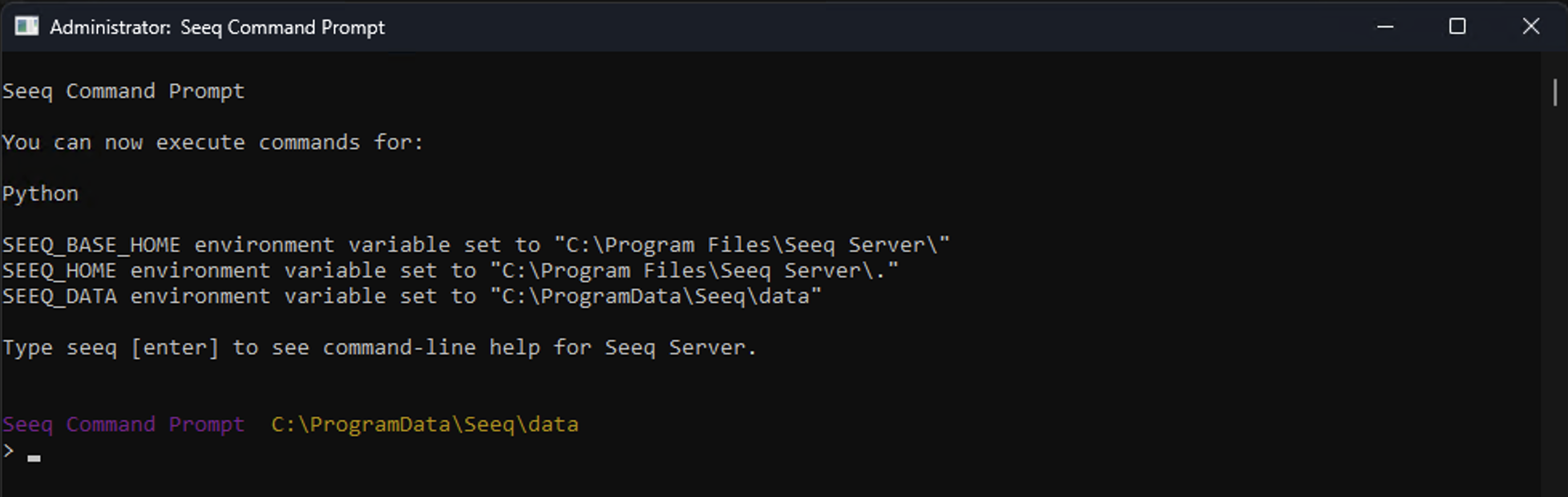
After datasource configuration changes, back up the agent’s SEEQ_DATA directory. This can be found by opening the Seeq Command Prompt and identifying the SEEQ_DATA environment variable as seen in the screenshot below.
Why This Matters
Backing up this directory allows you to:
-
Restore the agent after VM or machine failure
-
Avoid re‑provisioning and reconfiguring datasources
-
Preserve datasource identifiers and prevent worksheet breakage
This backup is particularly useful during:
-
OS rebuilds
-
VM loss
Datasource Authorization and Credential Rotation
Remote Agents authenticate to datasources using credentials defined in each datasource configuration.
Recommended Practice
Ensure there is an established process for:
-
Credential rotation
-
Password expiration
-
Service account changes
When credentials are rotated, the corresponding datasource configuration must be updated so the Remote Agent can continue to authenticate successfully.
Aligning this process with existing IAM or secrets‑management workflows typically works well.
Endpoint Security Considerations
If endpoint detection or protection (EDR) software is in use:
-
Ensure the Seeq installation and data directories are excluded from runtime scanning
-
Runtime inspection can significantly impact performance and interfere with upgrades or startup
Log review is generally only required during troubleshooting.
Operational Ownership Model
Seeq recommends managing Remote Agents and associated machines and/or VM’s using existing enterprise systems and processes, including:
-
Windows service management
-
Patch and change management
-
Endpoint security tooling
-
Monitoring and alerting platforms
-
Backup and recovery processes
Remote Agents are intentionally designed to behave like standard Windows infrastructure components rather than requiring specialized operational tooling.