
Overview
When setting up a new datasource or modifying an existing datasource configuration, some customers choose to use a separate test (development) Seeq Remote Agent to validate changes before applying them to a production Remote Agent.
A test Remote Agent can be used to isolate configuration and validation activities, including changes to connectivity, authorization, connector behavior, and transforms. Access to datasources exposed by the test Remote Agent is typically limited to a subset of users involved in validation or testing.
The use of a test Remote Agent is optional and depends on a customer’s operational, security, and change-management requirements.
When This Pattern May Be Useful
Validating new datasource configurations
A test Remote Agent can be used to confirm connectivity and authentication, verify schema, metadata, and signal definitions, evaluate query behavior and performance, and confirm the correctness of returned data.
Testing authorization or credential changes
Some customers use a test Remote Agent when changing the service account used to access a datasource, modifying database permissions, or validating authentication changes before applying them to production.
Reconfiguring connector behavior
Connector configuration changes that affect how data is queried or returned can be evaluated using a test Remote Agent. Examples include changes to query limits, Query definitions, or connector-specific tuning parameters.
Creating or debugging property transforms
Property transforms sometimes require iteration. A test Remote Agent can be used to create or modify property transforms, debug mapping or transformation logic, and validate derived metadata before it is exposed more broadly.
Architecture Pattern
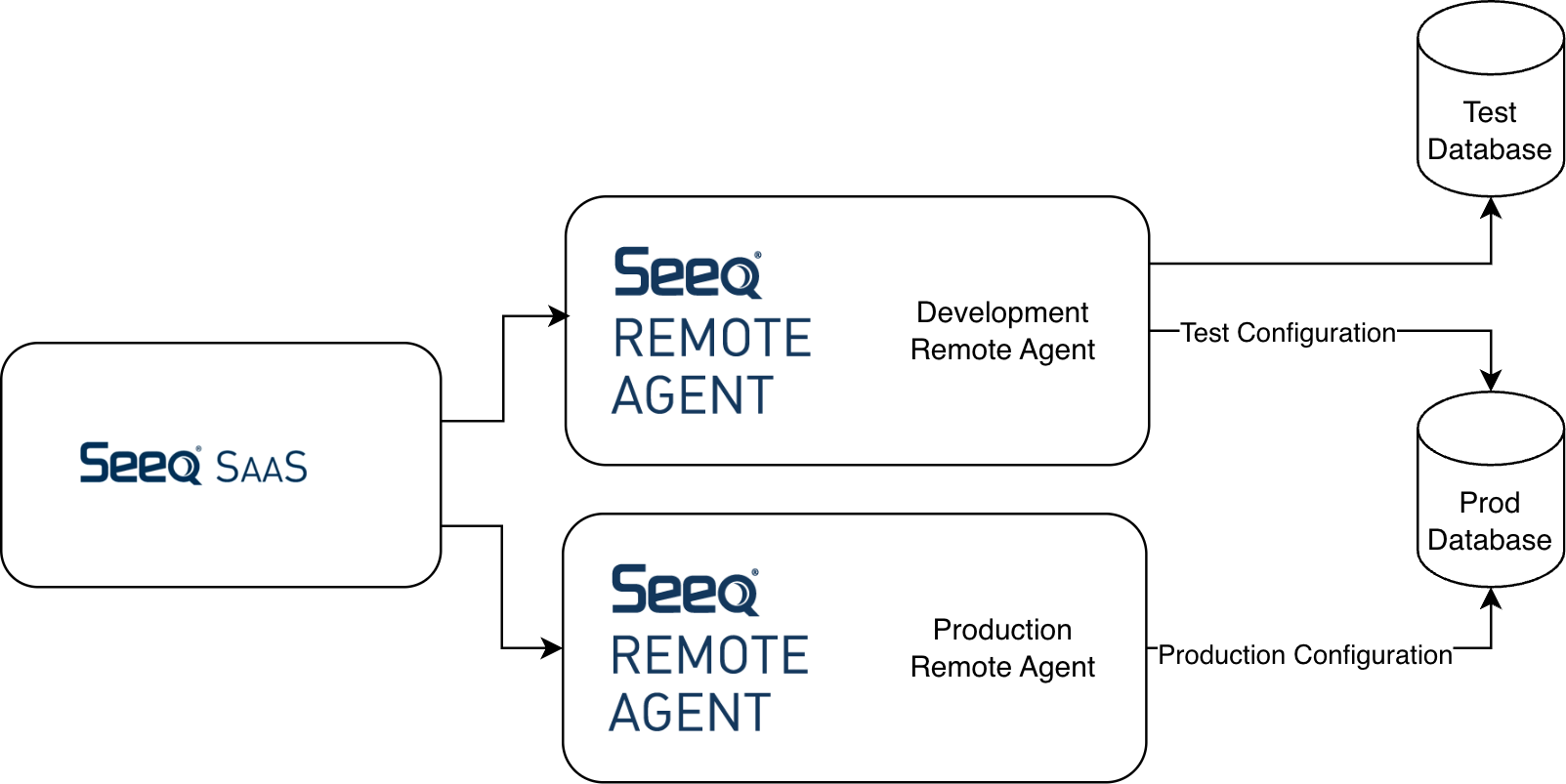
In this pattern, Seeq SaaS connects to more than one Remote Agent. A test (development) Remote Agent is used for validation activities, while a production Remote Agent continues to serve established production workloads.
The test Remote Agent may connect to dedicated test or non-production datasources, or to production datasources using alternate credentials, permissions, or configuration. Datasources served by the test Remote Agent are typically visible only to a limited group of users.
Authorization and Access Control
When using a test Remote Agent, some customers restrict access by creating a dedicated Seeq user group for validation or testing and granting that group access only to datasources served by the test Remote Agent. Broader user access to in-progress or experimental configurations is typically limited until validation is complete.
This approach allows configuration and testing activities to occur without exposing incomplete or changing configurations to production users.
Moving a Validated Datasource Configuration to Production
When a datasource configuration has been validated using a test Remote Agent, the configuration will need to be moved to the production remote agent.
This is typically done by navigating to the Datasource Administration page in Seeq, creating a new datasource in the production Remote Agent, and copying the validated configuration from the test datasource. Any environment-specific details such as credentials, service accounts, hostnames, endpoints, or permissions are then updated as needed.
The production datasource is created as a separate configuration and is not automatically linked to the test datasource. Once created, access to the production datasource can be granted to the appropriate user groups according to the customer’s access control model.