
Inmation Connector
.NET AGENT
Item Type Support
SIGNALS ASSETS
Overview
The Inmation connector enables Seeq to access data from AspenTech Inmation. The Seeq connector for AspenTech Inmation reads your Inmation asset structure and represents it in Seeq as asset trees. It also reads sample data from matching tags and exposes that data in Seeq as signals.
Prerequisites
An Inmation server running version 1.100.0 or later.
An Inmation system with REST API access enabled.
Network connectivity from the Remote Agent machine to the Inmation host and port.
An Inmation account (BuiltIn, AD, or Machine authority) that can authenticate with the Inmation Web API.
Configuration
When you create a new Inmation datasource connection or edit an existing one, Seeq displays the connector settings in the Create new datasource connection or Modify connection dialog, respectively.
Enter the main connection settings in the form fields, including HostName, Port, Username, Password, RequestProtocol, and OAuthAuthority. Additional connector settings are also available in expandable sections such as ScriptIndexerConfig and IndexQualityTags.
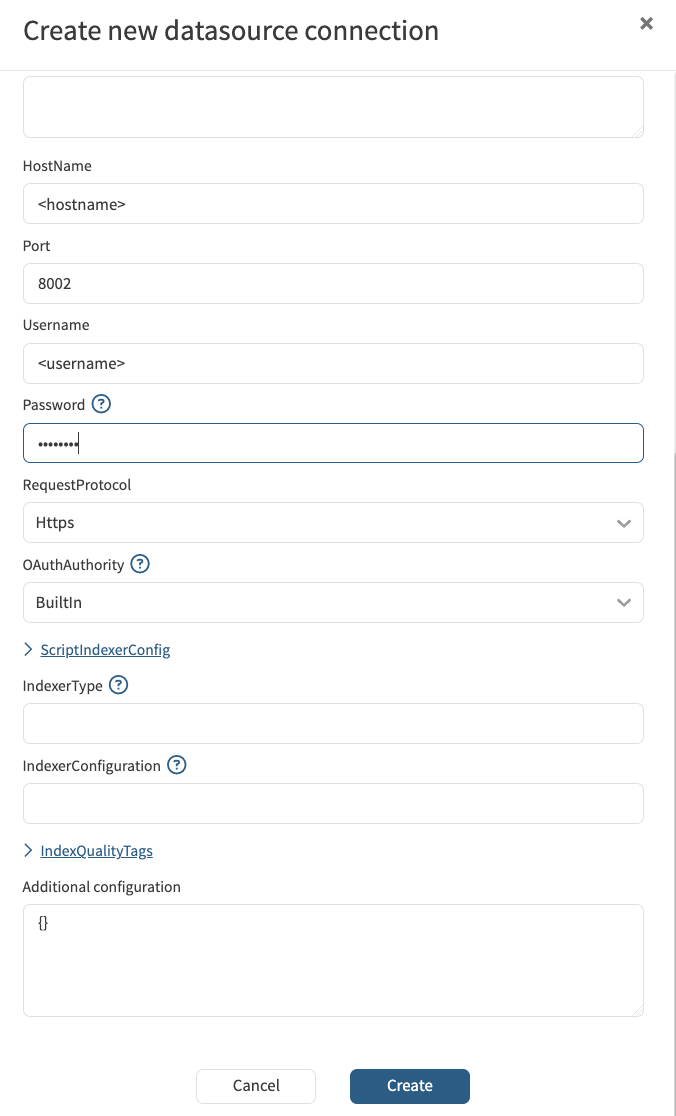
Inmation Configuration
Property Name | Default Value | Data Type | Description |
|---|---|---|---|
| String | Host name or IP address of the Inmation server. | |
|
| Integer | Port used by the Inmation REST API. |
| String | User name for OAuth authentication. | |
| Secret String | Password for the configured user. | |
|
| String | The protocol to be used to communicate with the Inmation server. In addition to the default, |
|
| String | Where credentials are validated. |
| Complex Object | Configuration for the script-based indexer. See InmationScriptIndexerConfigV1 below. | |
| Complex Object | Configuration for quality tag indexing and display. See QualityTagHandlingConfigV1 below. |
Inmation Script Indexer Configuration
Configuration for the script-based indexer that traverses the Inmation object hierarchy. This settings are display when the ScriptIndexerConfig option is expanded.
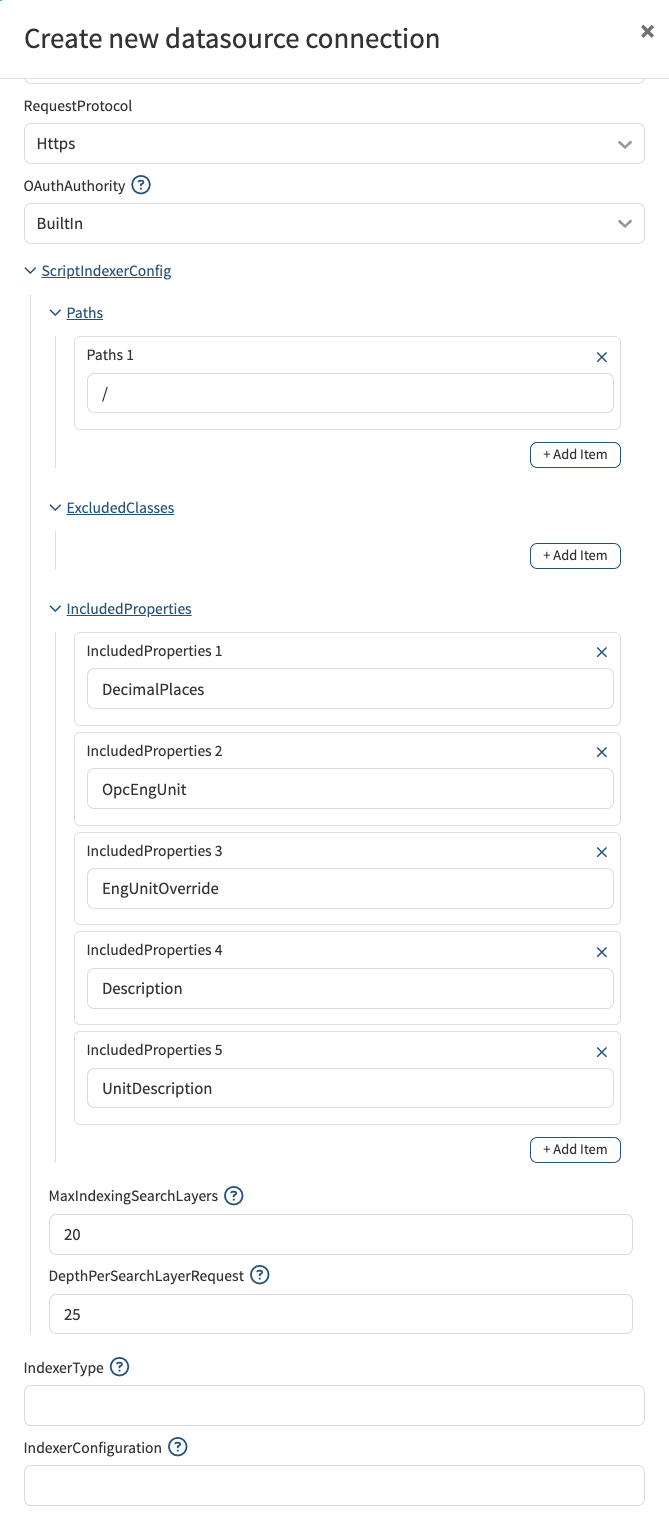
Property Name | Type | Default | Constraints | Description |
|---|---|---|---|---|
|
|
| Required, min 1 item | The list of root paths in the Inmation hierarchy to index. |
|
|
| Required, min 0 items | Inmation object class IDs to exclude from indexing. See the Inmation Classes Doc for details. NOTE: once a class is excluded, any node of that class type and its children are excluded from indexing. |
|
|
| Required, min 0 items | These are names of Inmation object fields (custom/read-model properties) that the connector requests on each Inmation API call, alongside a fixed set ( |
|
| 10 | Required, min 2 | Used as the |
|
| 10 | Required, min 1 | A safety cap on how deep the indexer will walk by absolute depth in the merged logical tree. Past this depth, children are not processed for that branch. This protects Seeq from runaway or cyclical trees. Increase if deep tags or assets under a path are missing from Seeq after indexing. Decrease to limit work on extremely deep, cyclical, or problematic hierarchies. |
Inmation Index Quality Tags Configuration
Configuration for how quality tags are indexed and displayed alongside signals. Quality tags hold data about the quality values for each sample in the associated tag. This settings are display when the IndexQualityTags option is expanded.
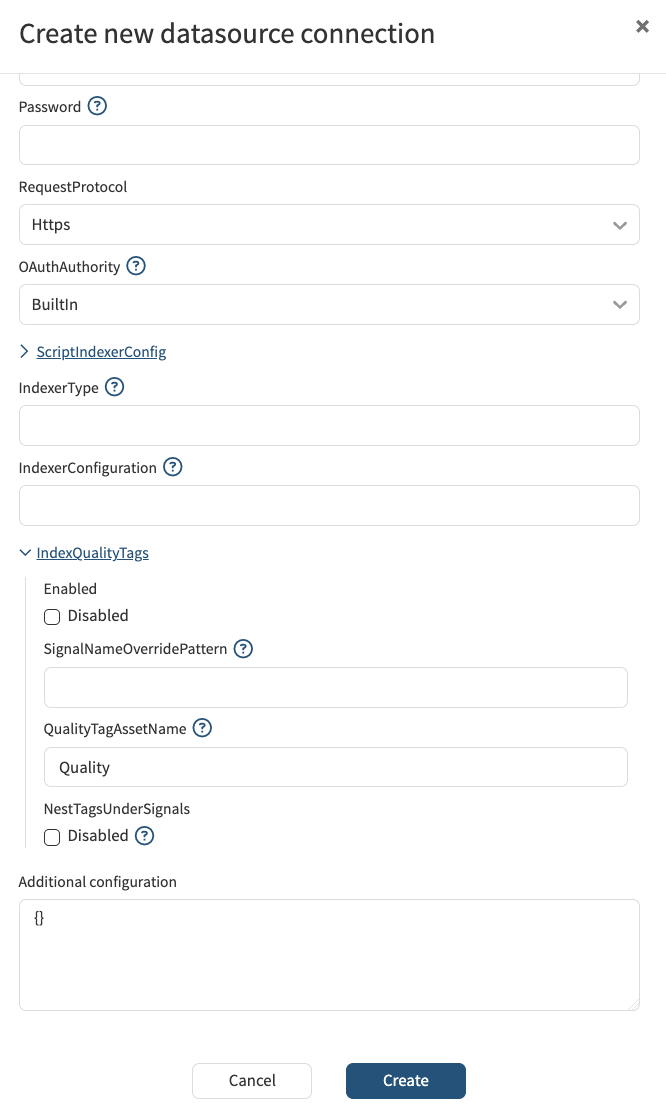
Property Name | Type | Default | Constraints | Description |
|---|---|---|---|---|
|
|
| Required | Determines if signals to display quality values are created for each tag signal during indexing. Other fields in this config apply only if enabled |
|
|
| Optional | This lets users change the display name of generated companion quality signals. If empty, the Indexer defaults to the signal name plus "Quality" as the suffix. The field supports a replacement token "{parent}", letting users customise quality signal names. For example, if a customer sets the field to "Qual-for-{parent}" and has a signal named "Temperature", the quality signal will be named "Qual-for-Temperature". Users can control word order and wording while linking the name to the parent signal. |
|
|
| Optional | When |
|
|
| Required | Name of the synthetic child asset created under the same parent asset as the process signal to group quality companion signals. Used only when |
Known Issues
There are no known issues for the Inmation connector. Please report any issues you find to our support portal.
Troubleshooting
If you are running into issues with connecting to or access data from Inmation, view our guide for troubleshooting datasource issues.
Performance considerations
If your Inmation server has adequate hardware resources, increase
DepthPerSearchLayerRequestto reduce the number of API round trips and speed up indexing for deep trees. Increment in small steps — setting it too high can cause Read Model calls to time out or return very large JSON payloads that strain the Inmation server.
View optimizing datasource performance for general guidance.