
Connecting Nodes
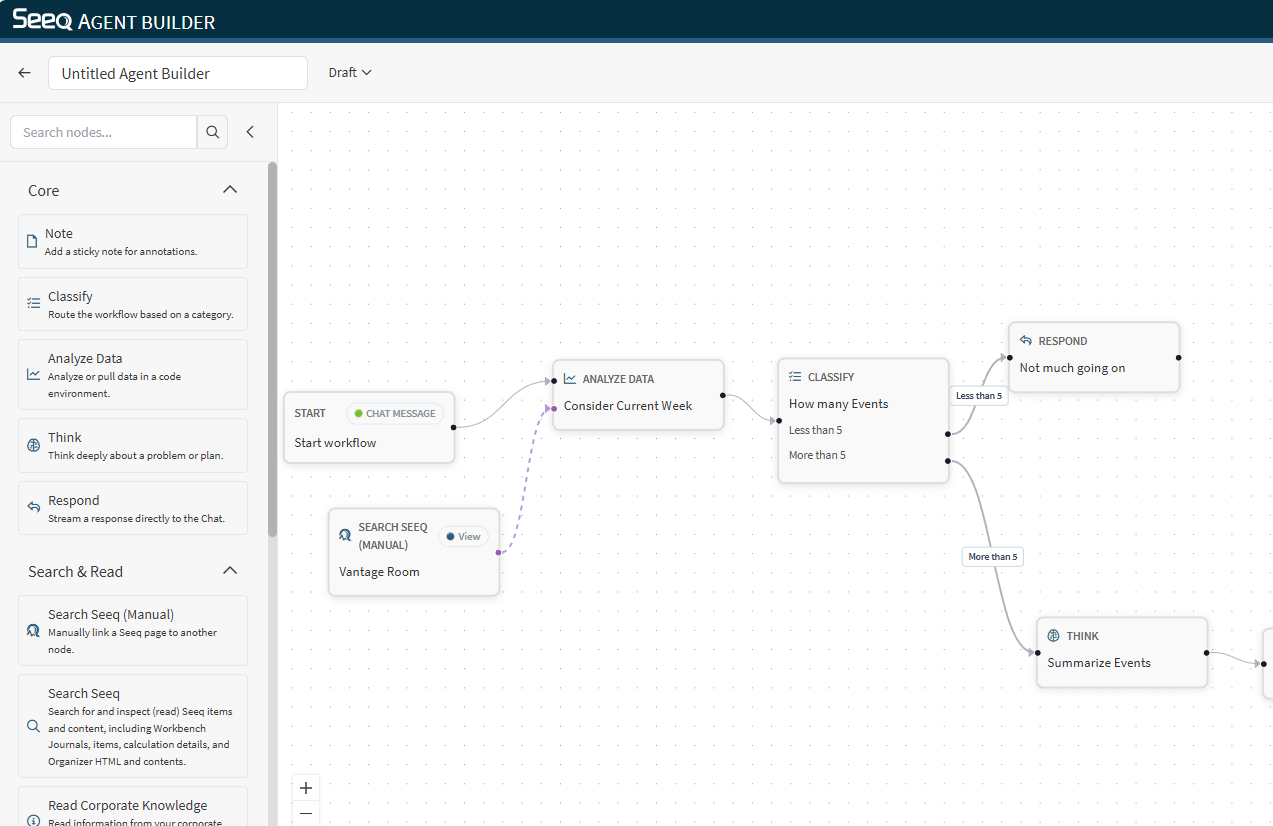
Workflow edges
Workflow edges define the standard execution order:
Example:
Start → Search → Read → Respond
Nodes can have multiple incoming workflow edges. When a node has multiple parents, it can use the outputs of upstream nodes as context.
For Agent, Action, and Classify nodes, this upstream context is configurable through Manage memory in the node inspector:
All previous steps includes all upstream outputs.
Only immediate previous step includes only direct parent outputs.
No memory includes no upstream outputs.
If a node has multiple direct parents, only immediate previous step includes output from all direct parents.
Classify edges (routing)
The Classify node routes execution to different branches.
Each category on a Classify node has its own output handle.
The edge label displays the category name.
Learn more: Classify Node
Context edges (Seeq scope)
Context edges attach a Seeq context node to a node that supports context. These are represented with purple dashed lines.
Context edges are dashed and connect to the node’s context handle.
Context edges do not represent execution order; they represent “what this node should operate on.”
Common connection rules
The Start node is the beginning of the workflow.
Context edges must connect from a Seeq context node to a node’s context handle.
Workflow edges should connect to a node’s main input handle.