
Classify Node
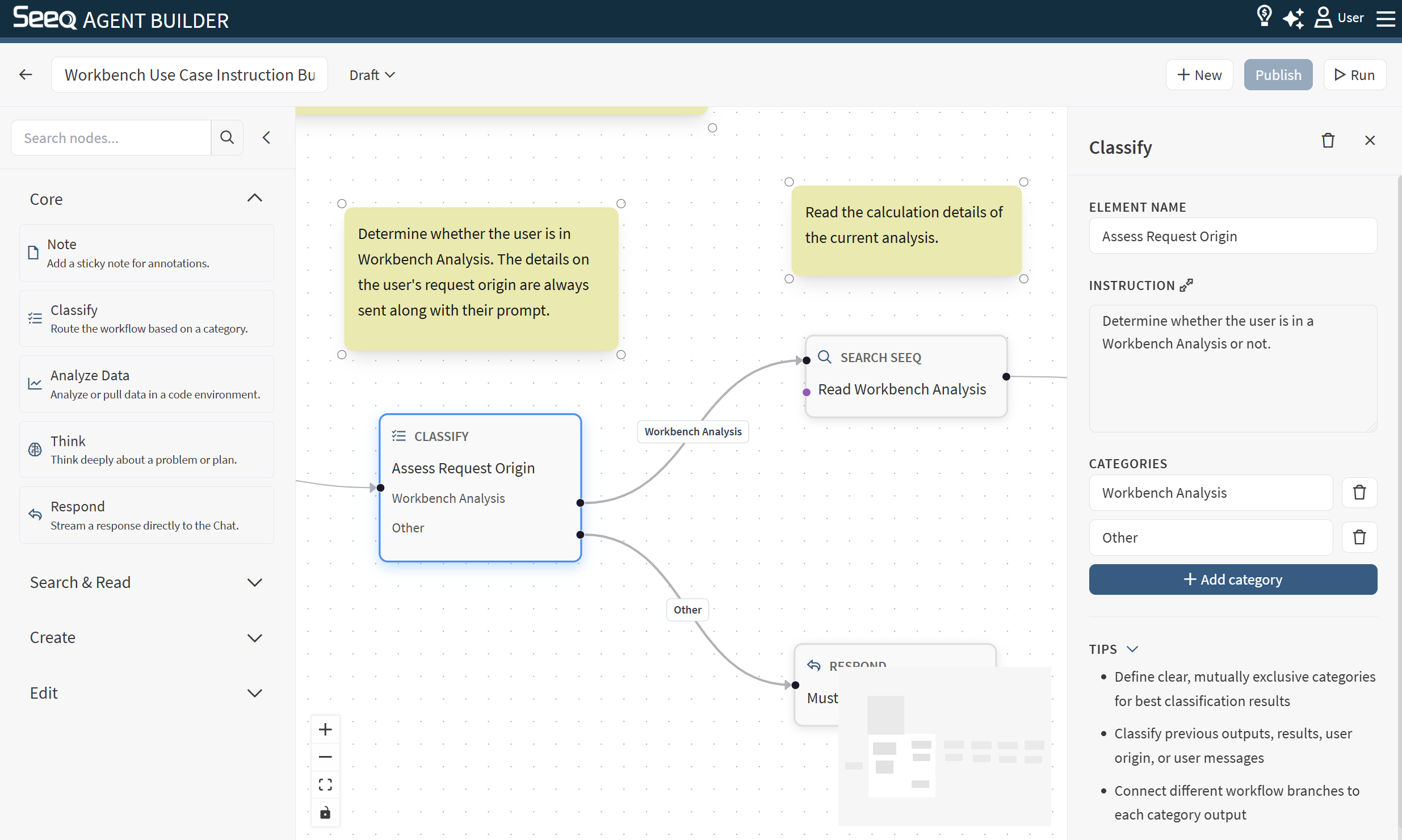
Use Classify to route the workflow to different branches based on the user’s request.
When to use
You want different handling for different intents (e.g., “search” vs “analyze” vs “write”).
You want different behavior based on the area of Seeq the user is working in (Workbench, Organizer, Data Lab, Vantage). If a custom agent is expecting to be running with context on the page from Workbench, you can add a classify node to exit the agent if the active browser is on a different application.
You want a safe “gate” before taking actions that create or change content.
How it works
The Classify node reads the conversation context and its instruction.
It selects one category from the list you define.
The workflow continues down the edge connected to that category. Other branches are skipped.
Configuration
In the Classify inspector you can set:
Element name: A friendly title (recommended).
Instruction: What should the classifier consider when choosing a category.
Categories: The list of allowed routes (at least one).
Connecting branches
Each category creates an output handle (appearing as a dot on the right side of the node). Connect each category handle to the first node in its branch.
Tip:
Include an “Other” category and connect it to a safe fallback path (often respond).
What happens at runtime
The node returns exactly one category.
The workflow continues down the edge for the selected category.
Nodes reachable only from unselected branches are skipped.
Common issues
Missing categories (must have at least one).
Selected category has no outgoing edge (the run will fail).
Overlapping/ambiguous category labels (can lead to unexpected routing).