
The Signal Smoothing tool can be used to reduce high frequency noise from signals using one of five different filters: Seeq Agile, Savitzky-Golay (SG), Low Pass, Moving Average or Exponential.
Using the Signal Smoothing Tool
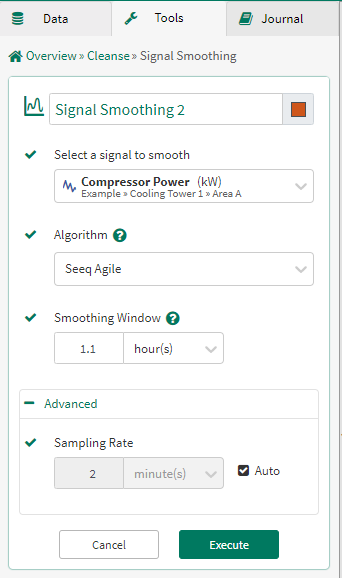
Select the signal to search: From the dropdown menu select a signal from the details pane, pinned items or recently used sections.
Specify the filter type: Choose to filter using the Seeq Agile Filter, Savitzky-Golay (SG) Filter, Low Pass Filter, Moving Average Filter or Exponential Filter.
Specify the smoothing window: The length of the input signal that the filter can 'see' during its computation. Default = 33 times the period; must be between 3 and 101 times the period, inclusive. (Note: this field is not used in the exponential filter).
Advanced Options
Specify the sampling rate: The spacing between samples output by this filter. If you don’t specify this value, Seeq will calculate it automatically based on the signal you select.