
Admin users can enable particular Seeq features for all users on a server by making changes in the central configuration page.
Current Beta Features
|
Feature |
Description |
Configuration Name |
|---|---|---|
|
External Tools |
Ability to add external tools in Tools panel. It adds an additional group to the existing Tools panel. |
Feature/ExternalTools/Enabled |
|
Extensible Workbench |
Ability to add an option to the top-left hand dropdown (where Trend, Scatterplot, Treemap and Scorecard are now) that gives the plugin control over the main part of the application to the right of the Data/Tools/Journal area and below the header. |
Features/Plugins/Enabled |
|
Scheduled Notebooks |
Ability to schedule execution of Data Lab notebooks |
Features/DataLab/ScheduledNotebooks/Enabled |
Changing Feature Configurations
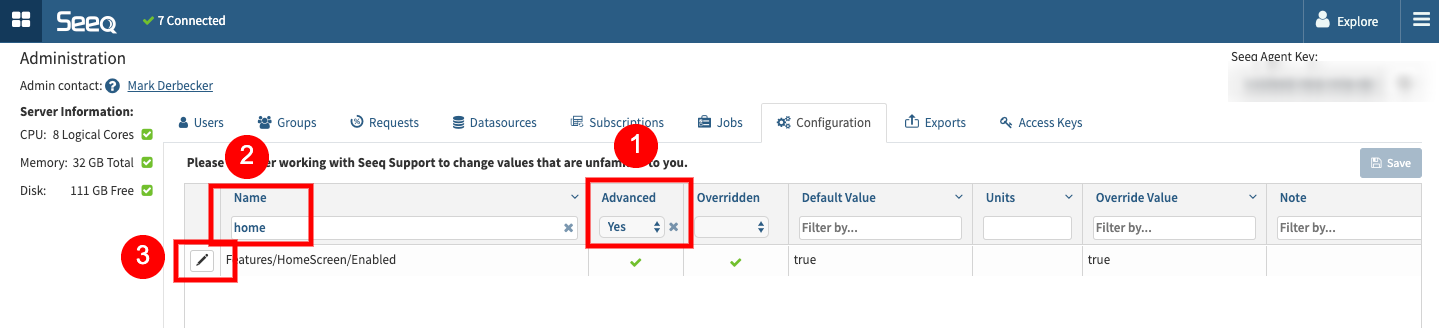
-
Select “Yes” in the Advances filter
-
Search for the “Configuration Name”
-
Select Edit
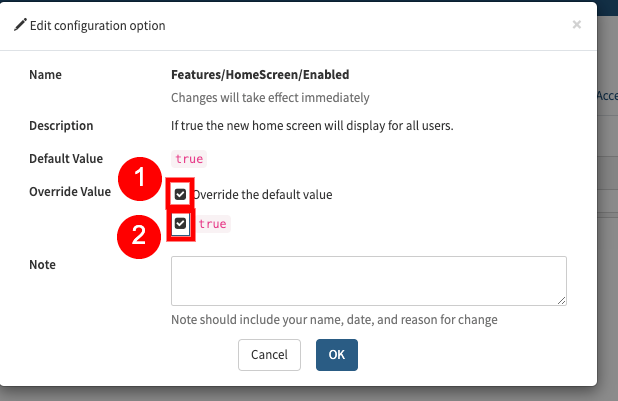
-
Enable Override Value
-
Flip the switch from False to True