
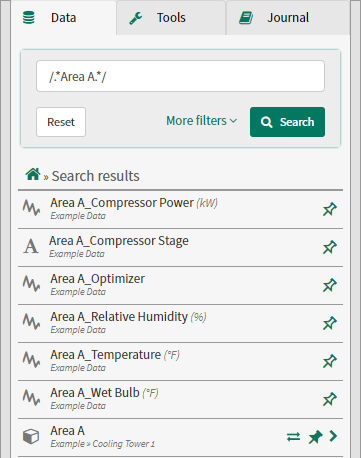
Regular Expression Search
If more complex searches are required, you can leverage the "Regular Expression" capabilities built into Seeq. To enter "regex" mode, you include the forward slash ‘/’ before and after your regex expression in the Search textbox. Note that Regex searches are case sensitive.
You can learn about and experiment with regular expressions at sites like https://regex101.com/.
Regex Examples
/.*[B-D]+.*Hu.*/ in the name field
returns
Area B_Relative Humidity, Area C_Relative Humidity, Area D_Relative Humidity
because…
/ represents the beginning or end of a regular expression in the Seeq search bar
. means any character
* means 0 or more repetitions of the preceding character
[B-D] means any character in the set {B, C, D}
+ means exactly one instance of the preceding character or group
/.+.+1-X.*/ in the name field
returns all items whose name has a “1-X” as the third through fifth characters, because .+ means exactly one of any character, and .* allows anything after the fifth character.
On the other hand,
/.+.+1-X[HS]+.*/ in the name field
requires that the sixth character also be either H or S.
When one seeks all items whose name contains either “Temp” or “Pres”, the following regex could be used:
/.*(Temp|Pres).*/ in the name field
These examples are meant to get you started and give you a taste for what can be done with regexes. Seeq regexes are currently built to work with ElasticSearch. Here is a reference guide to using regular expressions with ElasticSearch:
https://www.elastic.co/guide/en/elasticsearch/reference/current/query-dsl-regexp-query.html
A fun, interactive way to improve your regex chops can be found at: https://regexone.com/